


Spot colours use correct setup
This check is making sure that the spot colours used in InDesign are matching the expected naming required.
Spot Colours can be used in addition to the CMYK print process, either adding eye-catching extra inks e.g. fluorescent pink or special finishes such as gold foil and varnishes. They can also be used to indicate physical production techniques such as cutter guides and embossing.
Spot colours can be used in two different ways:
- As PANTONE spot colour inks that are printed alongside the CMYK inks
- As markers for special finishes that are NOT printed as inks, but are added using additional print finishes, e.g FOIL, BRASS or SPOTUV
The use of the PANTONE colour library is required for inks that are not made from the CMYK process colours. The Pantone colour reference should be explicit in the spot colour name.
PANTONES spot colour names must start with the word PANTONE, followed by the PANTONE reference, e.g. PANTONE 186
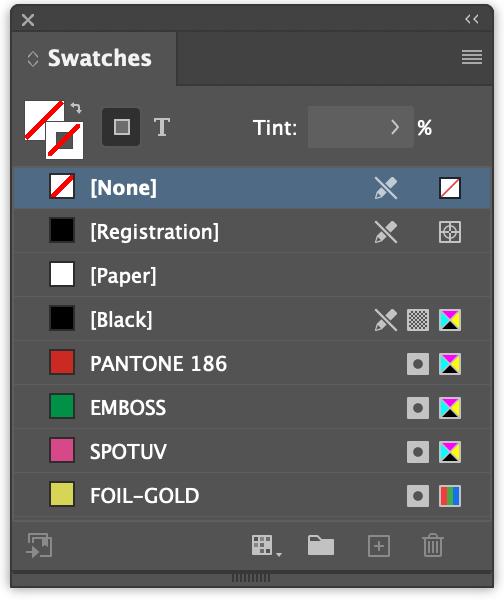
The naming of special finishes should indicate the finish that is to be used and be named according to the file creation policy of the client.
Spot colours imported in artwork created in other apps such as Photoshop and Illustrator are OK to use. They should also use the same PANTONE or special finish naming convention.


